Peer - Phase 1
Policies - Phase 2
Sunday, September 17, 2017

Saturday, September 16, 2017
Certificate
/certificate
add name=ca-template common-name=myCa key-usage=key-cert-sign,crl-sign
sign ca-template name=myCa
add name=hotspot-template common-name=hotspot
sign hotspot-template ca=myCa name=hotspot
###Make server certificate trusted
set [find name=hotspot] trusted=yes
add name=ca-template common-name=myCa key-usage=key-cert-sign,crl-sign
sign ca-template name=myCa
add name=hotspot-template common-name=hotspot
sign hotspot-template ca=myCa name=hotspot
###Make server certificate trusted
set [find name=hotspot] trusted=yes

UME
PPTP - Use GRE
UDP-8 byte
TCP - 20 byte
L2TP - 8 byte
PPP - 4 byte
IP - 20 byte
PPTP - 56 byte
PPP Bridge Control Protocol (BCP)
UDP-8 byte
TCP - 20 byte
L2TP - 8 byte
PPP - 4 byte
IP - 20 byte
PPTP - 56 byte
PPP Bridge Control Protocol (BCP)
Sunday, July 9, 2017
Mikrotik Wireless Mode
AP Bridge
- AP and Bridge (it can disable bridge for AP only mode)
- 2007 clients for AP
- 1 for bridge
- license level 3 (minimum) for bridge
Station
- It can connect both of AP and Bridge
- It can connect any AP devices
- If you want to bridge with other AP, you need to use Station Pseudobridge.
Station Bridge
- It can connect only Mikrotik devices.
Station Pseudobridge Clone
- It is use with client mac
Alignment Only
- Link test with sound beep
Nstreme dual slave
- It is for Nstreme Dual with 2 wireless cards. It can get full duplex.
Station WDS
- It can use as bridge.
AP Bridge with WDS
- create bridge with any name
- go to WDS
- choose bridge name and dynamic mode
- it will be network loop and STP spanning tree protocol need to use
- the best solution is adding access-list and connect list only one AP
- another solution is using Static WDS.... New WDS and put the MAC of desire AP
- If you will use different SSID, you can enable Ignore SSID
WDS Slave
- It can connect to AP bridge and different frequency But it will adopt the frequency from AP bridge.
Mesh Network (the best solution for WDS)
- add mesh interface
- use with WDS mode to Dynamic Mesh and choose mesh interface as bridge
- Static Mesh can also use.
- 2 type of
Virtual AP
- max 127 aps
- multi ssid with one network
- use IP firewall between 2 Virtual APs
- AP and Bridge (it can disable bridge for AP only mode)
- 2007 clients for AP
- 1 for bridge
- license level 3 (minimum) for bridge
Station
- It can connect both of AP and Bridge
- It can connect any AP devices
- If you want to bridge with other AP, you need to use Station Pseudobridge.
Station Bridge
- It can connect only Mikrotik devices.
Station Pseudobridge Clone
- It is use with client mac
Alignment Only
- Link test with sound beep
Nstreme dual slave
- It is for Nstreme Dual with 2 wireless cards. It can get full duplex.
Station WDS
- It can use as bridge.
AP Bridge with WDS
- create bridge with any name
- go to WDS
- choose bridge name and dynamic mode
- it will be network loop and STP spanning tree protocol need to use
- the best solution is adding access-list and connect list only one AP
- another solution is using Static WDS.... New WDS and put the MAC of desire AP
- If you will use different SSID, you can enable Ignore SSID
WDS Slave
- It can connect to AP bridge and different frequency But it will adopt the frequency from AP bridge.
Mesh Network (the best solution for WDS)
- add mesh interface
- use with WDS mode to Dynamic Mesh and choose mesh interface as bridge
- Static Mesh can also use.
- 2 type of
Virtual AP
- max 127 aps
- multi ssid with one network
- use IP firewall between 2 Virtual APs
Wednesday, May 3, 2017
Micros to Opera Report interface
1) Descriptor
2) Tracking
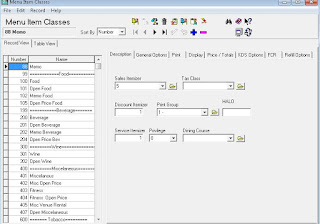
3) Menu Class --- Sale Itemizer
4) check in interface table
2) Tracking
3) Menu Class --- Sale Itemizer
4) check in interface table

Subscribe to:
Posts (Atom)